JavaScript Modules: Import and Export Explained

If you’ve ever tried to manage a JavaScript file that grew past 500 lines, you know the pain: variables colliding, functions stepping on each other, and the dreaded “cannot access before initialization” errors. That’s where modules come in.
JavaScript modules were introduced in ES6 (ECMAScript 2015) to solve this problem by allowing developers to split code into separate files with clear boundaries.
Let’s break down how JavaScript modules work, why they matter, and how to use import and export effectively.
Why Modules Are Needed
In the early days, JavaScript had no built-in module system. You’d load multiple <script> tags in HTML, and they all shared the same global scope.
Diagram 1: File Dependency Without Modules
index.html
     script1.js (global variable: app)
     script2.js (global variable: app) ← overwrites

script1.app
     script3.js (uses app, but gets wrong one)
This leads to:
Name collisions – two files using the same variable name
Tight coupling – scripts must load in exact order
Poor maintainability – changing one file breaks others silently
Modules solve these problems by giving each file its own private scope. Modules are like separate rooms in a house.
Exporting Functions or Values
To share code from a module, you use the export keyword.
Named exports (multiple per file)
// math.js
export const PI = 3.14159;

export function add(a, b) {
  return a + b;
}

export function subtract(a, b) {
  return a - b;
}
You can also export at the end:
const PI = 3.14159;
function add(a, b) { return a + b; }
function subtract(a, b) { return a - b; }

export { PI, add, subtract };
Default export (one per file)
// logger.js
export default function log(message) {
  console.log(`[LOG]: ${message}`);
}

// or
function log(message) {
  console.log(`[LOG]: ${message}`);
}

export default log;
A file can have multiple named exports and one default export.
Importing Modules
Use the import keyword to bring exported code into another file.
Importing named exports
// app.js
import { PI, add, subtract } from './math.js';

console.log(PI);          // 3.14159
console.log(add(5, 3));   // 8
You can also rename imports:
import { PI as piValue, add as sum } from './math.js';
Or import everything as a namespace:
import * as MathUtils from './math.js';

MathUtils.add(2, 3);      // 5
Importing a default export
import log from './logger.js';

log('Application started');   // [LOG]: Application started
Notice: no curly braces for default imports.
Mixed import (default + named)
// utils.js
export default function greet(name) { ... }
export const version = '1.0';

// main.js
import greet, { version } from './utils.js';
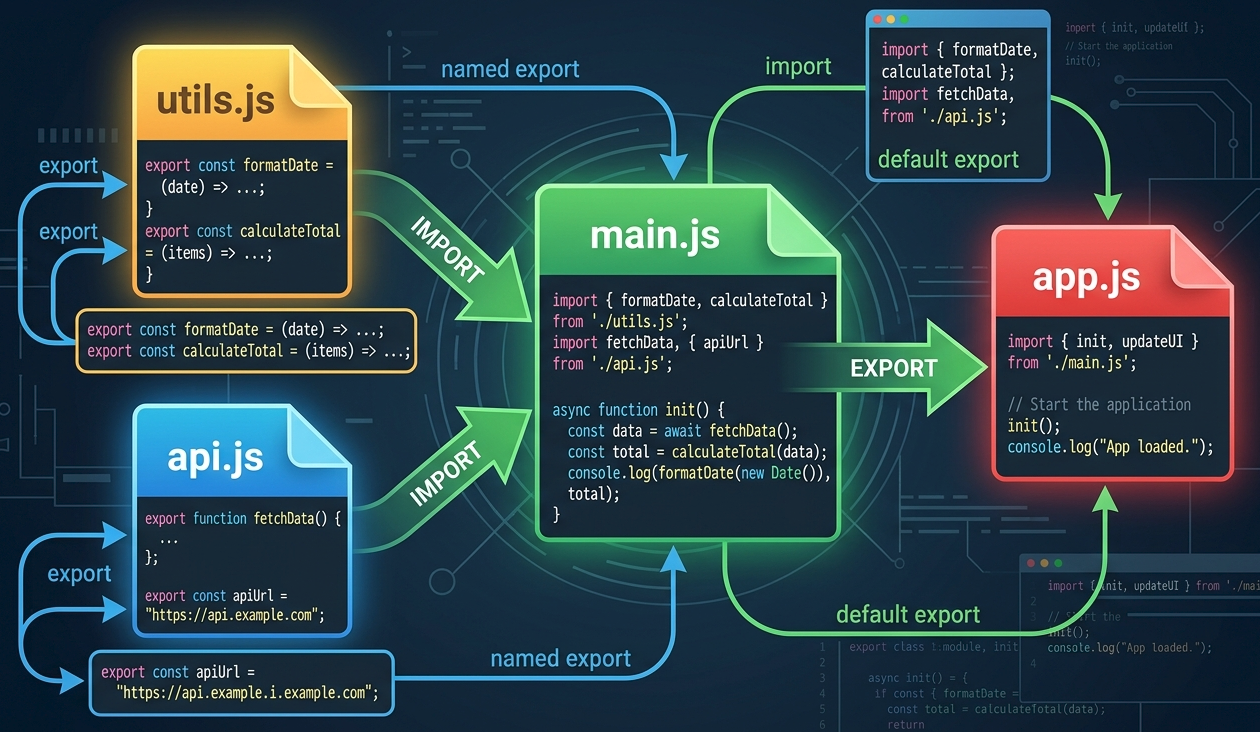
Default vs Named Exports – When to Use Which
| Feature | Named Export | Default Export |
|---|---|---|
| Per file | Multiple | Only one |
| Import syntax | { name } |
Any name you choose |
| Discoverability | Explicit in import | You decide the local name |
| Best for | Utilities, constants, multiple related functions | Main thing the file exports (class, main function) |
Example rule of thumb:
Use named exports for a collection of related tools (
math.js,array-helpers.js)Use default export when the file has one clear purpose (
User.js,logger.js)
Benefits of Modular Code
| Benefit | What it means |
|---|---|
| Encapsulation | Variables inside a module don’t leak globally |
| Reusability | Import the same module across many files |
| Explicit dependencies | You see exactly what each file needs |
| Easier testing | Test a module in isolation |
| No order worries | Imports resolve automatically |
| Refactoring friendly | Change one module without touching others |
Before modules (global mess)
// cart.js
let items = [];   // global
function addToCart(item) { ... }

// discount.js
let items = [];   // oops, overwrites cart.js items
After modules (clean)
// cart.js
const items = [];   // private to cart.js
export function addToCart(item) { ... }

// discount.js
import { addToCart } from './cart.js';  // explicit, no collision
Quick Reference
// user.js
export const role = 'admin';
export default function getUser() { ... }

// main.js
import getUser, { role } from './user.js';
import * as User from './user.js';
import { role as userRole } from './user.js';
Final Thoughts
JavaScript modules aren’t just syntax sugar – they fundamentally change how you organize, maintain, and scale your code. Start by breaking one large file into logical modules. You’ll immediately notice fewer bugs and faster debugging.
Reference:
MDN Web Docs — JavaScript Modules (import/export)


